900+ Student Sucessfully Placed In last 15 Years

Institute वही जो Job दिलाये !

Best Power BI training Institute in Kirari

RKCE is the top choice for Power BI training in Kirari, offering hands-on learning with industry experts. Our course covers everything from basics to advanced topics like creating dashboards, DAX functions, and integrating Power BI with tools like Excel and SQL.

With flexible schedules, affordable fees, and certification support, we prepare you for a successful career in data analytics and business intelligence. Enroll at RKCE today and master Power BI!

Why Choose RKCE for Power BI ?

Expert Faculty

Learn from industry professionals with extensive real-world experience.

Practical Training

Real-world projects for hands-on skill building.

Affordable Fees

Quality training at competitive and accessible prices.

Industry-Relevant Curriculum

Courses designed to meet the latest trends and demands of the digital marketing industry.

Top Power BI Institute in Kirari?


RKCE is the top Power BI training institute in Kirari, offering a comprehensive course designed to equip students with advanced data visualization and business intelligence skills. Our expert-led program focuses on practical learning, covering everything from Power BI basics to creating interactive dashboards, mastering DAX functions, and integrating Power BI with tools like Excel and SQL. With flexible timings, affordable fees, and certification support, RKCE ensures students are job-ready for roles in data analytics and business intelligence. Join RKCE today to elevate your career with Power BI!

Power BI Course Details


RKCE offers a comprehensive Power BI course designed to equip students with in-demand skills in data visualization and business intelligence. The course starts with the basics of Power BI, including data importing, cleaning, and transformation. Students then progress to creating interactive dashboards and reports that provide actionable insights. Advanced topics like DAX functions, data modeling, and Power BI integration with Excel and SQL are also covered. Our program emphasizes practical learning through real-world projects, ensuring students gain hands-on experience. With affordable fees, flexible schedules, and certification support, RKCE prepares students for successful careers in roles like Data Analyst and Business Intelligence Developer. Join RKCE and unlock the power of data with Power BI!

Job Oppurtunities

Data Analyst

Reporting Analyst

Data Scientist

What You Will Learn

  • Overview of Power BI and its components
  • Installation and setup of Power BI Desktop
  • Importing data from various sources (Excel, SQL, web, etc.)
  • Cleaning and transforming data with Power Query
  • Creating relationships between tables
  • Understanding data hierarchy and normalization
  • Managing calculated columns and measures
  • Introduction to DAX functions
  • Using calculated fields, measures, and time intelligence
  • Building interactive dashboards and reports
  • Using different chart types, KPIs, and slicers
  • Best practices for effective data visualization
  • Publishing reports to Power BI Service
  • Creating and managing workspaces
  • Collaborating and sharing dashboards
  • Connecting Power BI with Excel, SQL Server, and other tools
  • Real-time data analysis with Power BI Gateway
  • Custom visuals and R/Python integration
  • Paginated reports and Power BI Report Builder
  • Managing Power BI deployments
  • Configuring data refresh schedules and security settings
  • Hands-on projects to apply learning
  • Industry-specific case studies and problem-solving

FAQs

1. What are some of the most commonly used Advanced Excel functions?

Some popular Advanced Excel functions include:

  • VLOOKUP & HLOOKUP: For searching and retrieving data.
  • INDEX & MATCH: For flexible lookups.
  • SUMIFS & COUNTIFS: For conditional summing and counting.
  • IF, AND, OR: For logical tests and decision-making.
  • Pivot Tables: For summarizing and analyzing large datasets.
  • Macros & VBA: For automating repetitive tasks.
2. How can I use Excel to analyze large datasets?

You can use several tools and techniques in Excel to analyze large datasets, such as:

  • Pivot Tables: Quickly summarize and extract insights.
  • Data Validation & Conditional Formatting: Highlight specific data points.
  • Advanced Filtering & Sorting: Organize and refine data.
  • Power Query & Power Pivot: For data modeling and handling big data.
3. What are Excel Macros, and how do they work?

Excel Macros are a series of automated commands or actions that can be recorded to perform repetitive tasks quickly. They are created using Excel’s built-in Macro Recorder or by writing VBA (Visual Basic for Applications) code. Macros help save time by automating routine processes like data entry, formatting, and report generation.

4. How can learning Advanced Excel skills benefit my career?

Proficiency in Advanced Excel can significantly boost your career by enhancing your data management, analysis, and reporting skills. It is a highly valued skill in industries like finance, accounting, marketing, human resources, and operations management. Mastering Excel can lead to better job opportunities, promotions, and higher salaries.

5. What is the difference between Excel formulas and Excel functions?

Excel formulas are user-defined expressions that perform calculations using cell references, operators, and functions (e.g., =A1+B2). Functions, on the other hand, are pre-built Excel commands designed to perform specific tasks (e.g., SUM(), AVERAGE(), VLOOKUP()). Formulas can combine multiple functions to create complex calculations, making them powerful tools for data analysis.

OUR Testimonial

— Rajesh Kumar
— Rajesh Kumar
Read More
The Advanced Excel course at RKCE was incredibly valuable! The practical sessions helped me master complex formulas and data analysis, boosting my productivity at work.
— Megha Sharma
— Megha Sharma
Read More
I had a fantastic experience learning Advanced Excel at RKCE. The step-by-step guidance and real-world case studies made it easy to understand even the most complex functions.
— Amit Singh
— Amit Singh
Read More
Thanks to RKCE’s Advanced Excel course, I am now proficient in data management and reporting. It’s a must-do course for anyone looking to excel in their career.
Previous
Next
— Nidhi Verma
— Nidhi Verma
Read More
RKCE’s training in Advanced Excel is top-notch! The instructors are experts and explain everything clearly. I now feel confident using Excel for financial analysis.
— Vivek Patel
— Vivek Patel
Read More
I highly recommend the Advanced Excel course at RKCE. The practical exercises and real-time projects made me proficient in using Excel for business analytics.
— Sakshi Tiwari
— Sakshi Tiwari
Read More
I highly recommend the Advanced Excel course at RKCE. The practical exercises and real-time projects made me proficient in using Excel for business analytics
Previous
Next
— Deepak Mehta
— Deepak Mehta
Read More
RKCE’s course transformed the way I use Excel at work. The knowledge of macros and automation has saved me so much time on repetitive tasks.
— Priya Malhotra
— Priya Malhotra
Read More
Learning Advanced Excel at RKCE was a great investment in my career. The course content was comprehensive, and the trainers were highly supportive
— Anita Pandey
— Anita Pandey
Read More
The skills I gained from the Advanced Excel course at RKCE are invaluable. I can now handle large datasets and generate insightful reports effortlessly.
Previous
Next

Why Every Business Needs a Professional Website Design in 2026

Discover why professional website design is essential for every business in 2026. Learn how a well-designed website builds trust, attracts customers, and boosts sales.

Introduction

In today’s digital world, having a strong online presence is no longer optional—it is a necessity. Whether you run a small shop, a startup, or a large company, your website is the face of your business on the internet. People search online before making decisions, and your website is often the first impression they get about your brand.

A professional website design is not just about looks; it is about performance, user experience, and business growth. In 2026, competition is higher than ever, and businesses without a proper website are losing valuable opportunities.

In this blog, we will explore why every business needs a professional website design and how it can help you grow faster.
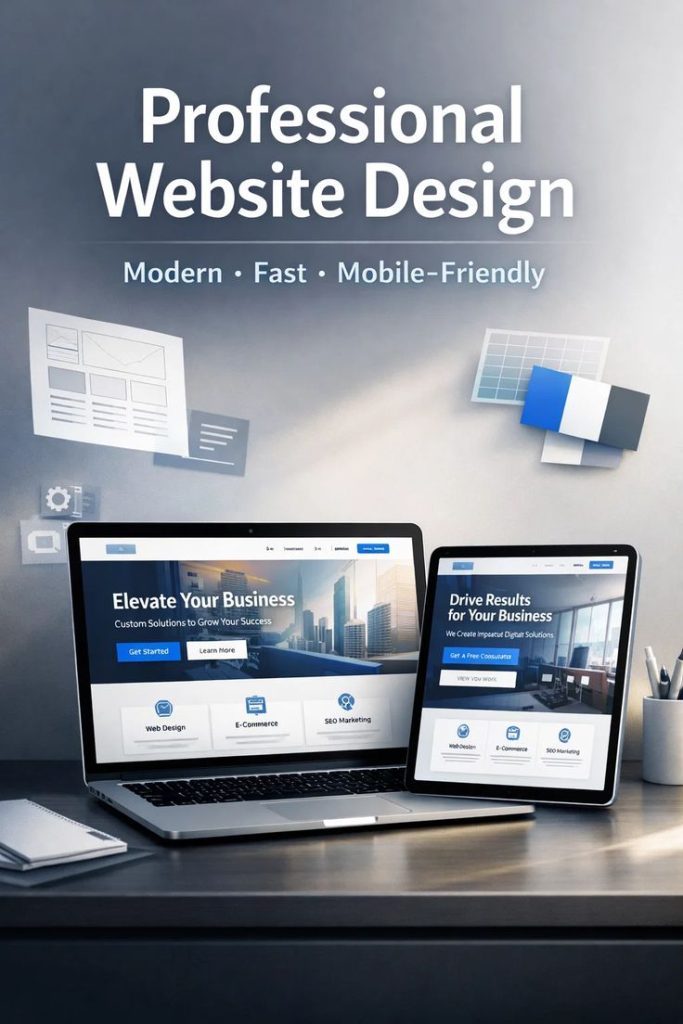

professional website design

1. First Impression Matters

Your website is like your digital showroom. When a visitor comes to your website, they decide within seconds whether they trust your business or not.

A poorly designed website can:

  • Look unprofessional
  • Confuse users
  • Drive visitors away

On the other hand, a professional website:

  • Looks clean and modern
  • Builds trust instantly
  • Encourages users to explore more


2. Builds Trust and Credibility

In 2026, customers are smart. They research before buying anything. If your business does not have a professional website, people may doubt your credibility.

A well-designed website helps you:

  • Show your business details clearly
  • Display customer reviews and testimonials
  • Present your products/services professionally

When users see a polished and organized website, they feel confident in choosing your business.


3. 24/7 Online Presence

Unlike a physical shop, your website works 24/7. It allows customers to:

  • Learn about your business anytime
  • Browse your products or services
  • Contact you even outside working hours

This means your business is always open online, increasing your chances of getting more customers.
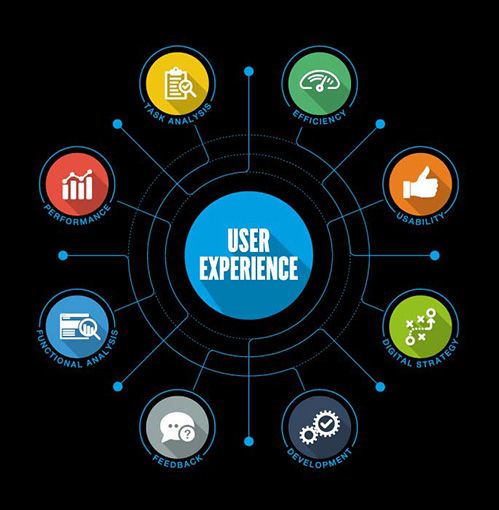

4. Better User Experience (UX)

User experience plays a big role in website success. A professional website is designed to make it easy for visitors to:

  • Navigate through pages
  • Find information quickly
  • Take action (buy, contact, subscribe)

A good website design ensures:

  • Fast loading speed
  • Mobile-friendly layout
  • Easy navigation


5. Mobile-Friendly Design is a Must

Today, most people use smartphones to browse the internet. If your website is not mobile-friendly, you are losing a large number of potential customers.

A professional website design ensures:

  • Responsive design (works on all devices)
  • Smooth mobile experience
  • Easy readability on small screens


6. Helps in SEO (Search Engine Optimization)

A well-designed website is not just for users—it is also important for search engines like Google.

Professional website design includes:

  • Proper structure and coding
  • Fast loading speed
  • SEO-friendly layout

This helps your website rank higher in search results, bringing more organic traffic.


7. Increases Sales and Conversions

The main goal of any business website is to generate leads and sales.

A professional website design focuses on:

  • Clear call-to-action (CTA) buttons
  • Attractive layout
  • Easy checkout process

For example:

  • “Buy Now” button
  • “Contact Us” form
  • “Get a Quote” option


8. Competitive Advantage

Your competitors already have websites. If your website is outdated or poorly designed, you are at a disadvantage.

A professional website helps you:

  • Stand out from competitors
  • Showcase your unique services
  • Build a strong brand identity

9. Supports Digital Marketing

All digital marketing efforts lead to your website.

Whether it is:

  • Social media marketing
  • Google ads
  • Email marketing

A professional website ensures:

  • Better landing pages
  • Higher conversion rates
  • Improved marketing performance

.


10. Easy to Update and Manage

Modern websites are built with easy management systems. This allows you to:

  • Update content anytime
  • Add new products or services
  • Make changes without technical knowledge

11. Builds Brand Identity

Your website reflects your brand. A consistent design helps people remember your business.

It includes:

  • Logo
  • Colors
  • Fonts
  • Style


12. Cost-Effective Investment

Many businesses think website design is expensive, but it is actually a smart investment.

Benefits include:

  • Long-term business growth
  • Increased customer reach
  • Higher profits


13. Showcases Your Products and Services

Your website is the best place to display what you offer.

You can:

  • Add product images
  • Write detailed descriptions
  • Highlight key features


14. Improves Customer Support

A website can also improve customer service by providing:

  • FAQs
  • Chat support
  • Contact forms


15. Data and Insights

With tools like analytics, you can track:

  • Number of visitors
  • User behavior
  • Popular pages


Conclusion

In 2026, a professional website design is not a luxury—it is a necessity for every business. It helps you build trust, attract customers, and grow your brand online.

A well-designed website:

  • Creates a strong first impression
  • Improves user experience
  • Boosts SEO and traffic
  • Increases sales and conversions

If you want your business to succeed in today’s competitive market, investing in a professional website design is one of the best decisions you can make.

Leave a Comment

Scroll to Top